Agentic AI — Part 5: Tools & function calling
You already know the cast from earlier parts: Part 1 set the scene, Part 2 introduced agents, Part 3 drew boxes for planner and executor, and Part 4 named core ingredients like LLMs and memory. Part 5 focuses on the bridge between language and action: tools, function calling, and a few specialized agent shapes teams talk about every week—web search, running code, talking to databases.
Read slowly. None of this requires a particular cloud vendor; it requires clear contracts and adult supervision in code.
Below, each major topic includes numbered steps you can follow when designing or reviewing a system, a Java sketch (com.codepathindia.agenticai.part5) you can paste into a scratch module, plus a clean illustration that matches that topic.
What is tool calling?
Tool calling means your system lets an automated step invoke something outside plain chat—usually a function you wrote or an HTTP endpoint you trust. The model might suggest the call, but your runtime decides whether it actually runs.
Step by step: how tool calling fits together
- Name the boundaries. Decide what counts as “inside the model” (text planning, explanations) versus “outside” (payments, tickets, database rows, external HTTP).
- Register tools explicitly. Each capability becomes a named operation with a short human description and a typed contract for inputs (IDs, enums, amounts)—not a free-form paragraph.
- Expose the catalog to the orchestrator. Your agent loop passes that catalog to the model only when those actions are allowed for this user and this session.
- Treat proposals as proposals. When the model asks for a tool, your code checks authZ/authN, rate limits, and business rules before anything runs.
- Record observations. After execution, append success or failure back into context so the next step is grounded in facts, not guesses.
Think of tools as labeled buttons behind glass:
- Only buttons you installed exist.
- Each button expects typed inputs (numbers, IDs, enums—not “whatever”).
- Pressing a button has side effects you must understand (money moves, rows change, emails leave).
Without tools, the assistant can only rearrange words. With tools, it can participate in workflows—which is exactly why tool design belongs next to security review, not “prompt tweaks.”
Tiny analogy
A voice assistant that only speaks is like a colleague who gives advice through a locked door. Tool calling is handing them a company phone with speed-dial numbers you configured. They still cannot dial arbitrary numbers—only the ones on the list.
Java sketch — registry and allowlist before side effects
Matches Part 2’s idea of named tools, but stresses your gate: unknown tools and disallowed names never execute.
package com.codepathindia.agenticai.part5;

import java.util.HashMap;
import java.util.Map;
import java.util.Optional;
import java.util.Set;

public final class ToolRegistrySketch {

    @FunctionalInterface
    public interface SideEffectTool {
        String run(Map<String, Object> args);
    }

    private final Map<String, SideEffectTool> registered = new HashMap<>();

    public void register(String name, SideEffectTool tool) {
        registered.put(name, tool);
    }

    /** Model proposals enter here — enforce allowlist + existence before any IO. */
    public Optional<String> executeIfAllowed(String toolName, Map<String, Object> args, Set<String> allowedForSession) {
        if (!allowedForSession.contains(toolName)) {
            return Optional.of("OBSERVATION: denied — tool not allowed for this session");
        }
        SideEffectTool tool = registered.get(toolName);
        if (tool == null) {
            return Optional.of("OBSERVATION: denied — unknown tool name");
        }
        return Optional.of("OBSERVATION: " + tool.run(args));
    }
}
Illustration
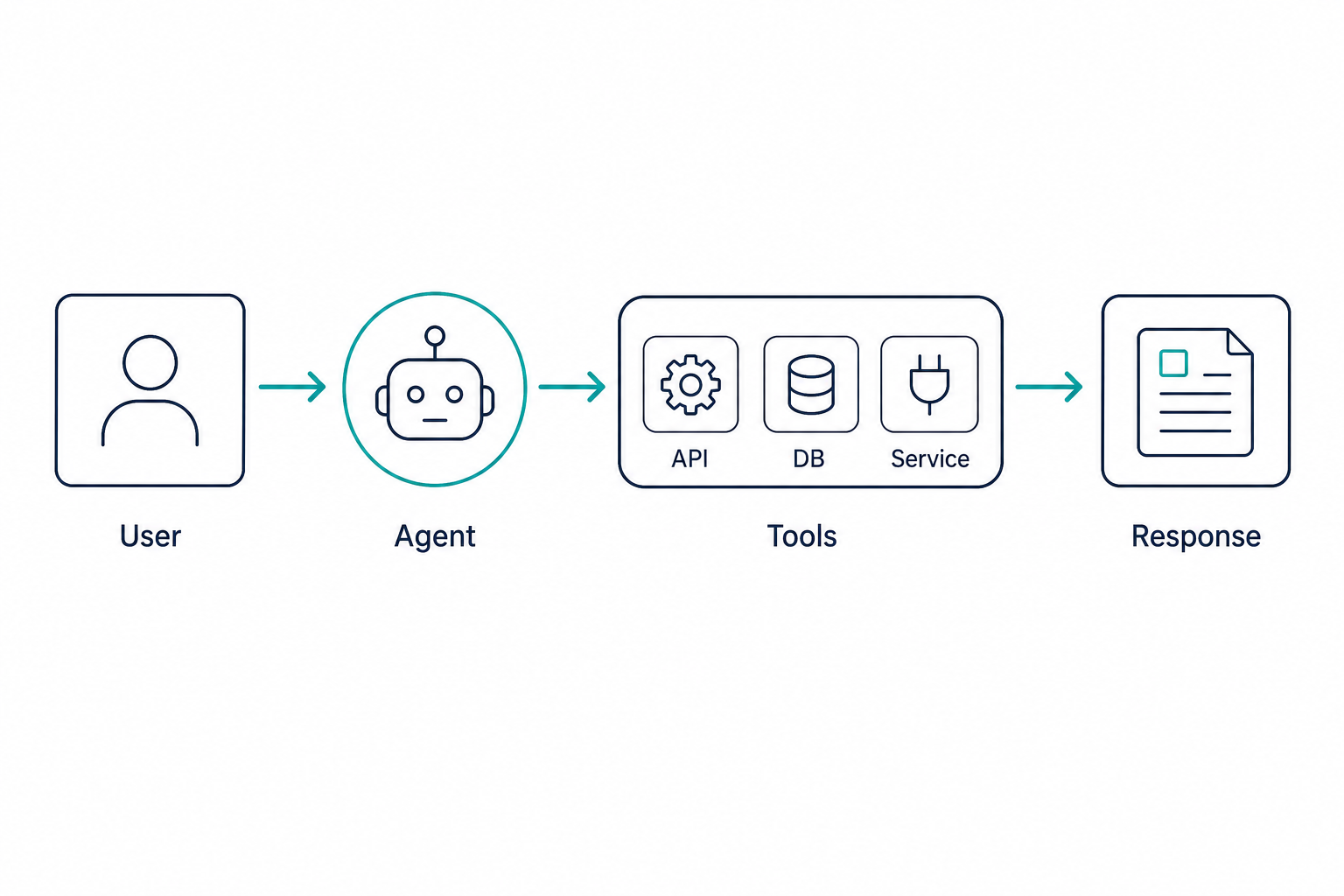
Function calling in AI agents
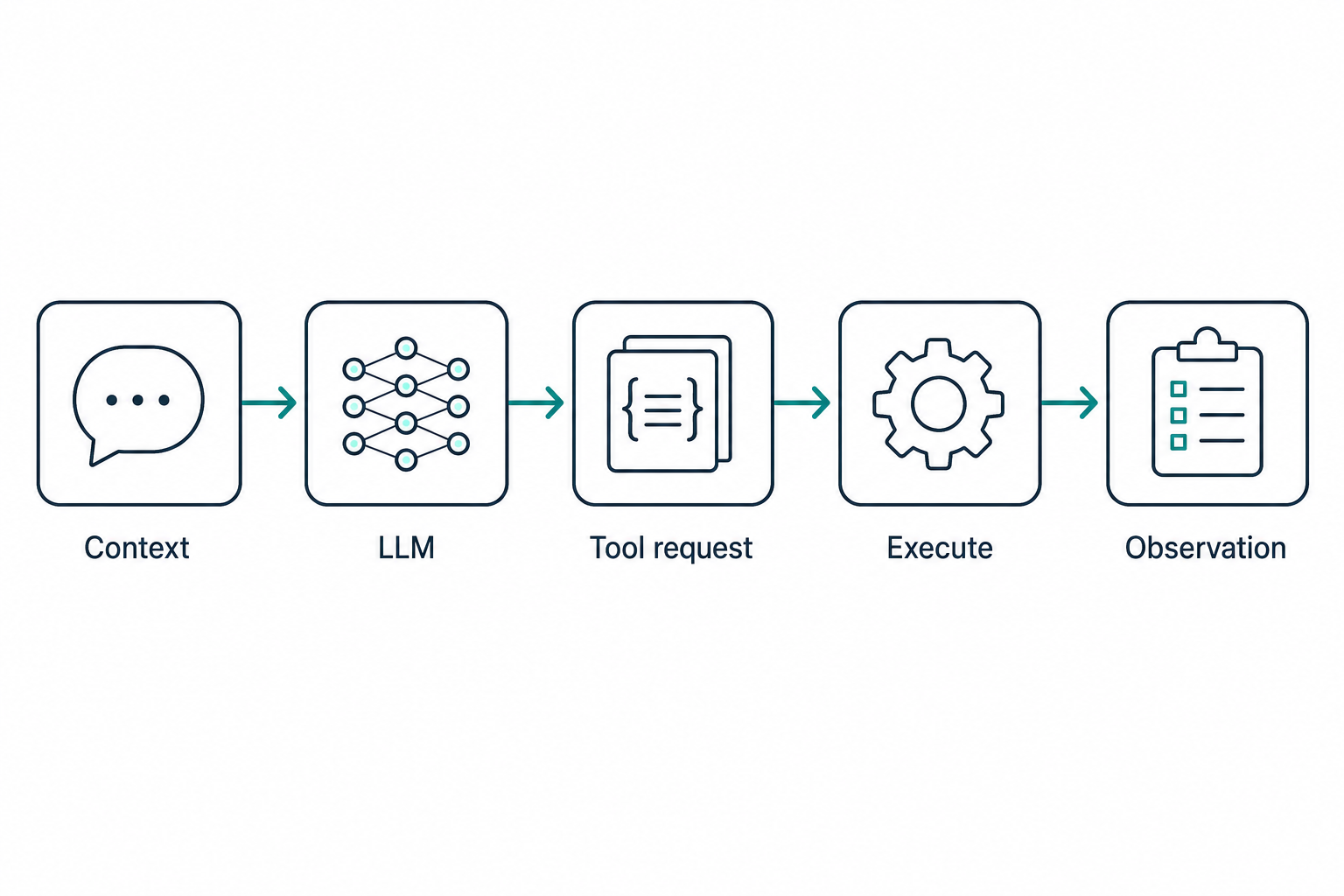
Function calling (sometimes named tool use or structured tool invocation) is the pattern where the model returns machine-readable intent: “call function X with arguments A, B, C” instead of only returning a paragraph of explanation.
Step by step: one turn through function calling
- Build context. Send the user message, short policy hints, and any prior tool results—trimmed so you stay within token limits.
- Attach the tool catalog. Supply machine-readable definitions: function name, plain-language description, and parameters (often JSON Schema–style).
- Parse the model reply. Either you get normal text, or your SDK extracts tool name + arguments from a structured segment.
- Validate shape and meaning. Schema checks catch missing fields and wrong types; your domain layer catches impossible IDs or forbidden actions.
- Execute and loop. Run the tool, append the observation, and call the model again if another step is needed—until you hit a final answer or a cap you configured.
Why bother?
- Precision: Arguments can be validated against a schema before anything runs.
- Audit: Logs show which tool fired with which payload.
- Composition: One planner step can map cleanly to one Java method or REST route.
That loop is the same one architects draw on whiteboards: context in, tool catalog attached, structured reply parsed, tool executed, observation fed back—repeat until done or until you hit a turn limit.
Nothing here says the model must be “correct.” It only proposes; your executor is still responsible for reality.
Mental model for backend builders
In a Spring Boot service you might expose internal operations as beans (WeatherClient, TicketService). Function calling is how you map model output to @Service methods without copying secrets into the prompt. Keep secrets in environment variables, vaults, and OAuth flows—not inside temperature-2 prose.
Pitfall to avoid early
Treating function calling as automatic correctness. Structured JSON can still encode wrong customer IDs or disallowed actions. Schema validation catches shape errors, not business errors—you still need domain checks.
Java sketch — parse proposal, then dispatch (stub parser)
Production code should use your vendor SDK or Jackson + JSON Schema validation. This stub shows the shape only: string in → typed name + args → your executor.
package com.codepathindia.agenticai.part5;

import java.util.HashMap;
import java.util.Map;

public final class FunctionCallParsingSketch {

    public record ParsedCall(String toolName, Map<String, Object> arguments) {}

    /**
     * Demo-only extraction — replace with robust JSON parsing.
     * Example payload shape: {"tool":"get_order_status","order_id":"42"}
     */
    public static ParsedCall parseLoose(String jsonish) {
        String tool = grab(jsonish, "\"tool\":\"", "\"");
        String orderId = grab(jsonish, "\"order_id\":\"", "\"");
        Map<String, Object> args = new HashMap<>();
        if (!orderId.isEmpty()) {
            args.put("order_id", orderId);
        }
        return new ParsedCall(tool, args);
    }

    private static String grab(String s, String prefix, String closing) {
        int i = s.indexOf(prefix);
        if (i < 0) {
            return "";
        }
        i += prefix.length();
        int j = s.indexOf(closing, i);
        return j > i ? s.substring(i, j) : "";
    }
}
Illustration
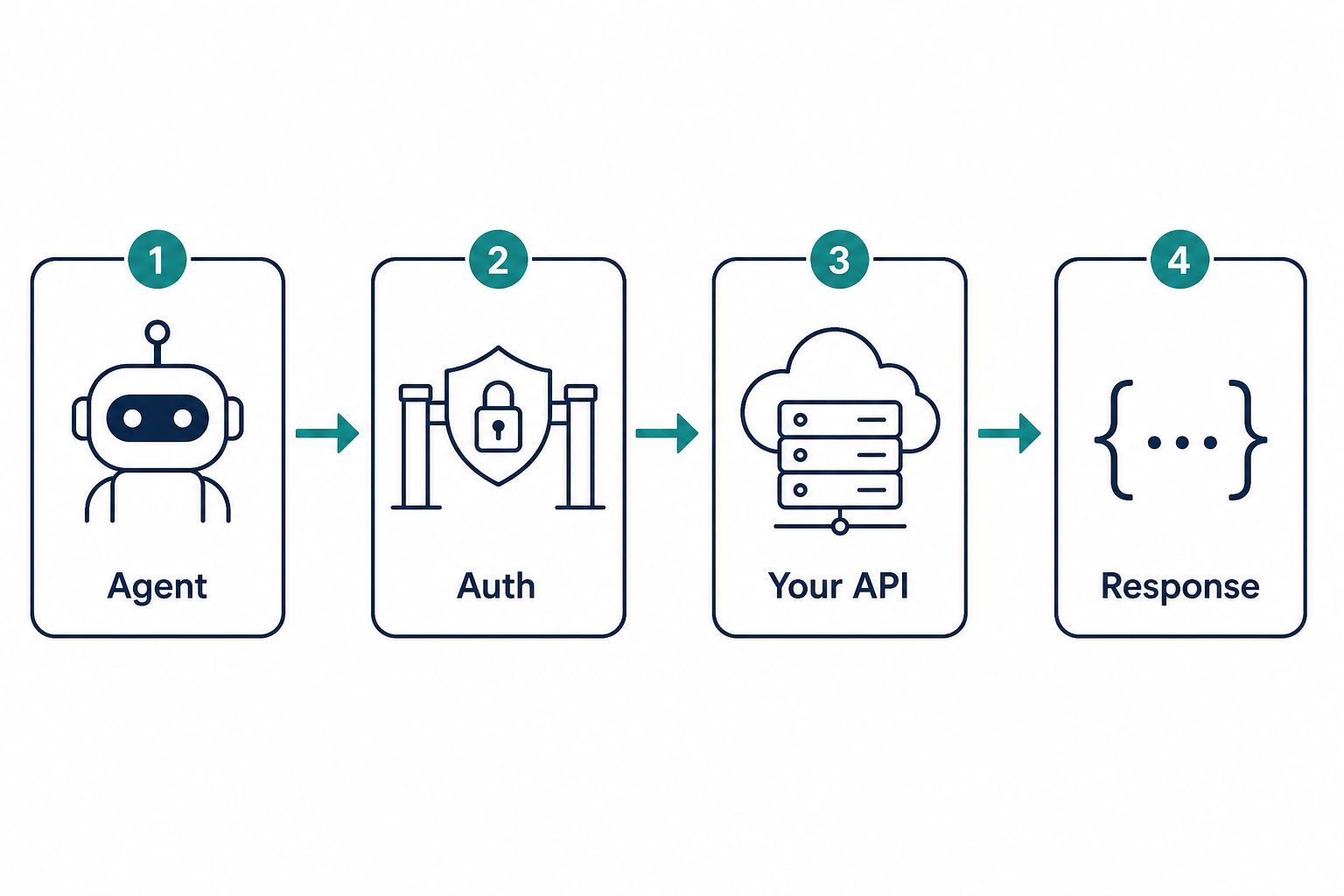
API calling with AI agents
When people say API calling with AI agents, they usually mean: HTTP requests (REST, GraphQL, internal gateways) triggered after some reasoning step—often wrapped as a single tool like http_get or create_ticket.
Step by step: safe API tools
- Prefer named tools over raw URLs. Implement
get_order_status(order_id)instead offetch(anything)so abuse surface stays small. - Keep secrets server-side. API keys and OAuth live in env, vaults, or workload identity—never in prompts or client-visible traces.
- Apply production HTTP discipline. Timeouts, retries with backoff, circuit breakers where appropriate, and clear mapping of HTTP status to retry vs fail.
- Design writes for repeats. Use idempotency keys or natural dedupe so a double-invocation does not double-charge.
- Return a tidy observation. Normalize errors into something the model can summarize without leaking stack traces or tokens.
What good looks like
- Allowlist hosts or base URLs; block open-ended “call any URL.”
- Authenticate the same way your other services do: service accounts, API keys from secrets, short-lived tokens—not strings pasted into chat logs.
- Timeouts and retries with backoff; distinguish transient failures from business failures.
- Idempotency for POST-like operations when retries happen (idempotency keys, dedupe tables).
Pattern many teams use
One narrow tool per important capability beats one mega-tool that accepts “URL + body.” Mega-tools are hard to test and easy to abuse.
Example
Instead of a generic fetch(url), ship:
get_order_status(order_id)→ hits your order API with server-side auth.create_support_ticket(subject, body)→ hits your ticketing integration with rate limits.
The model picks among named capabilities; it does not browse the open web like a browser unless you explicitly built that—and even then you constrain it.
Logging for trust
When something breaks at 2 a.m., you want logs that read: tool=refund_payment, args={order_id: "…"}, result=409 conflict, not a mystery blob. Design APIs and tools so operations are explainable to another engineer.
Java sketch — narrow GET tool with timeouts (Java 11+ HttpClient)
Load base URL and tokens from environment or Spring configuration—never from model text.
package com.codepathindia.agenticai.part5;

import java.net.URI;
import java.net.http.HttpClient;
import java.net.http.HttpRequest;
import java.net.http.HttpResponse;
import java.time.Duration;

public final class OrderStatusApiToolSketch {

    private final HttpClient http = HttpClient.newBuilder()
            .connectTimeout(Duration.ofSeconds(5))
            .build();

    public String getOrderStatus(String ordersApiBaseUrl, String bearerToken, String orderId) throws Exception {
        HttpRequest req = HttpRequest.newBuilder()
                .uri(URI.create(ordersApiBaseUrl + "/orders/" + orderId))
                .timeout(Duration.ofSeconds(10))
                .header("Authorization", "Bearer " + bearerToken)
                .GET()
                .build();
        HttpResponse<String> res = http.send(req, HttpResponse.BodyHandlers.ofString());
        return "tool=get_order_status order_id=" + orderId + " http=" + res.statusCode() + " body=" + res.body();
    }
}
Illustration
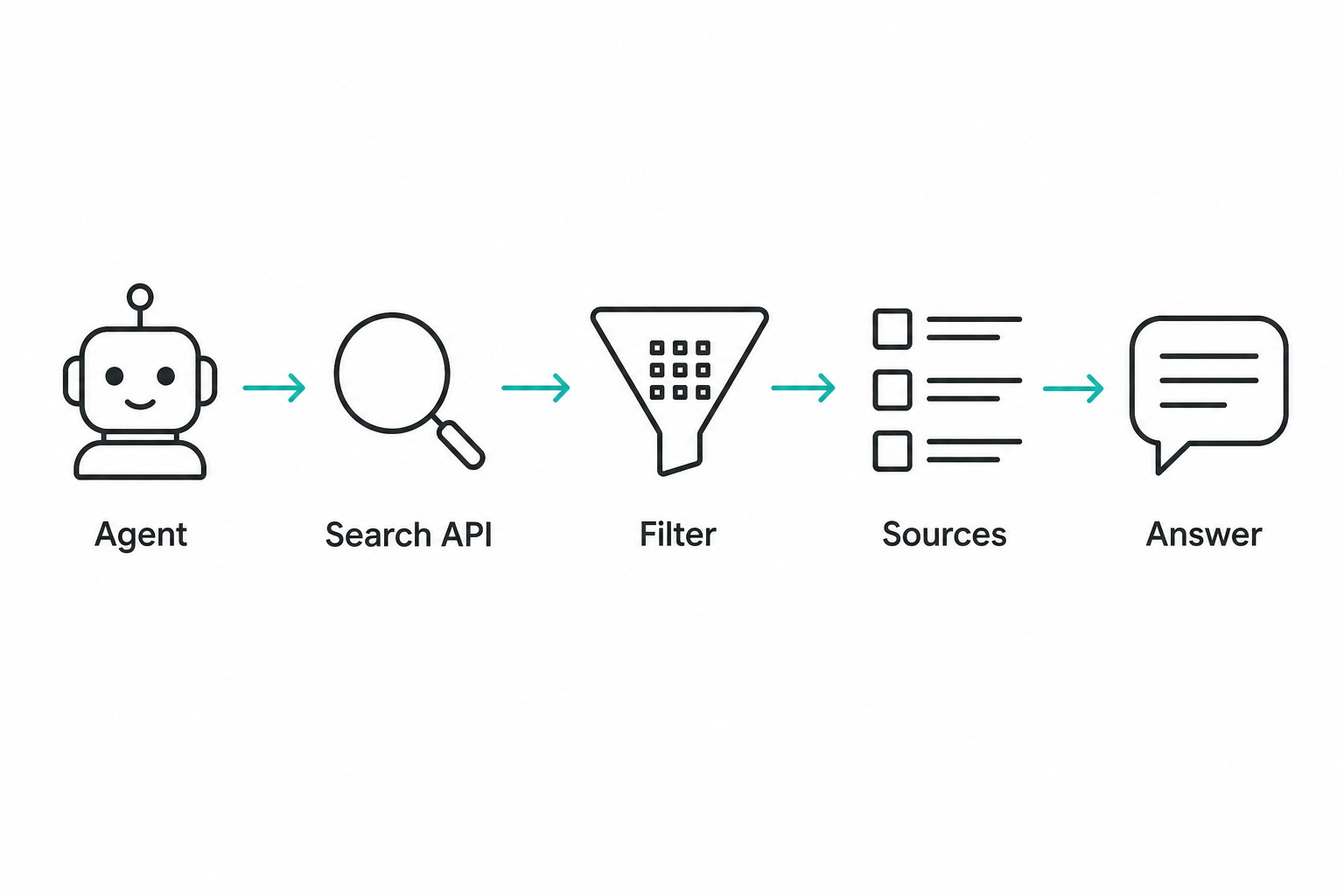
Web search agent
A web search agent uses search as a tool: fire a query, receive snippets or ranked URLs, then summarize or decide next steps.
Step by step: search without losing control
- Form the query deliberately. Optionally rewrite the user question into search terms; strip obvious PII if policy requires it.
- Call a sanctioned search API. Use a provider you license; avoid stealth scraping that breaks terms or robots rules.
- Filter and trim results. Allowlist domains for sensitive domains, cap snippet count, and drop low-trust sources when stakes are high.
- Feed curated text to the model. Pass summaries or excerpts—not whole pages of HTML—so context stays readable and injection surface shrinks.
- Ask for citations, then spot-check. For compliance-heavy answers, verify claims against primary sources, not only the model’s summary.
Why it is popular
The public web holds fresh facts—release dates, docs, news—that static training cutoffs miss. Search-augmented answers can feel more current when retrieval quality is good.
Why it is risky
- Source quality varies wildly; ranking does not equal truth.
- Prompt injection can hide in pages (“ignore prior instructions…”).
- Privacy: logging queries may leak sensitive user intent.
Practical guardrails
- Prefer search APIs you contract with, not silent scraping that violates terms.
- Allowlist domains for high-stakes domains (official docs, your own site).
- Cache aggressively for repeated queries; rate-limit per user.
- Ask the model to cite URLs it used; then verify critical claims for regulated domains.
Role in your architecture
Search is usually one tool among several (“search_web”, “read_internal_wiki”). The executor runs it; the critic or formatting layer decides how much of raw HTML/snippet soup reaches the user.
Java sketch — filter hits by allowed hosts
After your search provider returns URLs + snippets, shrink what the LLM sees. Swap List<Hit> for real API responses.
package com.codepathindia.agenticai.part5;

import java.net.URI;
import java.util.List;
import java.util.Locale;
import java.util.stream.Collectors;

public final class WebSearchToolSketch {

    public record Hit(String url, String snippet) {}

    public List<Hit> keepAllowedDomains(List<Hit> raw, List<String> allowedHosts) {
        return raw.stream()
                .filter(hit -> allowedHosts.stream().anyMatch(h -> hostEndsWith(hit.url(), h)))
                .limit(8)
                .collect(Collectors.toList());
    }

    private static boolean hostEndsWith(String url, String allowedSuffix) {
        try {
            String host = URI.create(url).getHost();
            return host != null
                    && host.toLowerCase(Locale.ROOT).endsWith(allowedSuffix.toLowerCase(Locale.ROOT));
        } catch (IllegalArgumentException ex) {
            return false;
        }
    }
}
Illustration
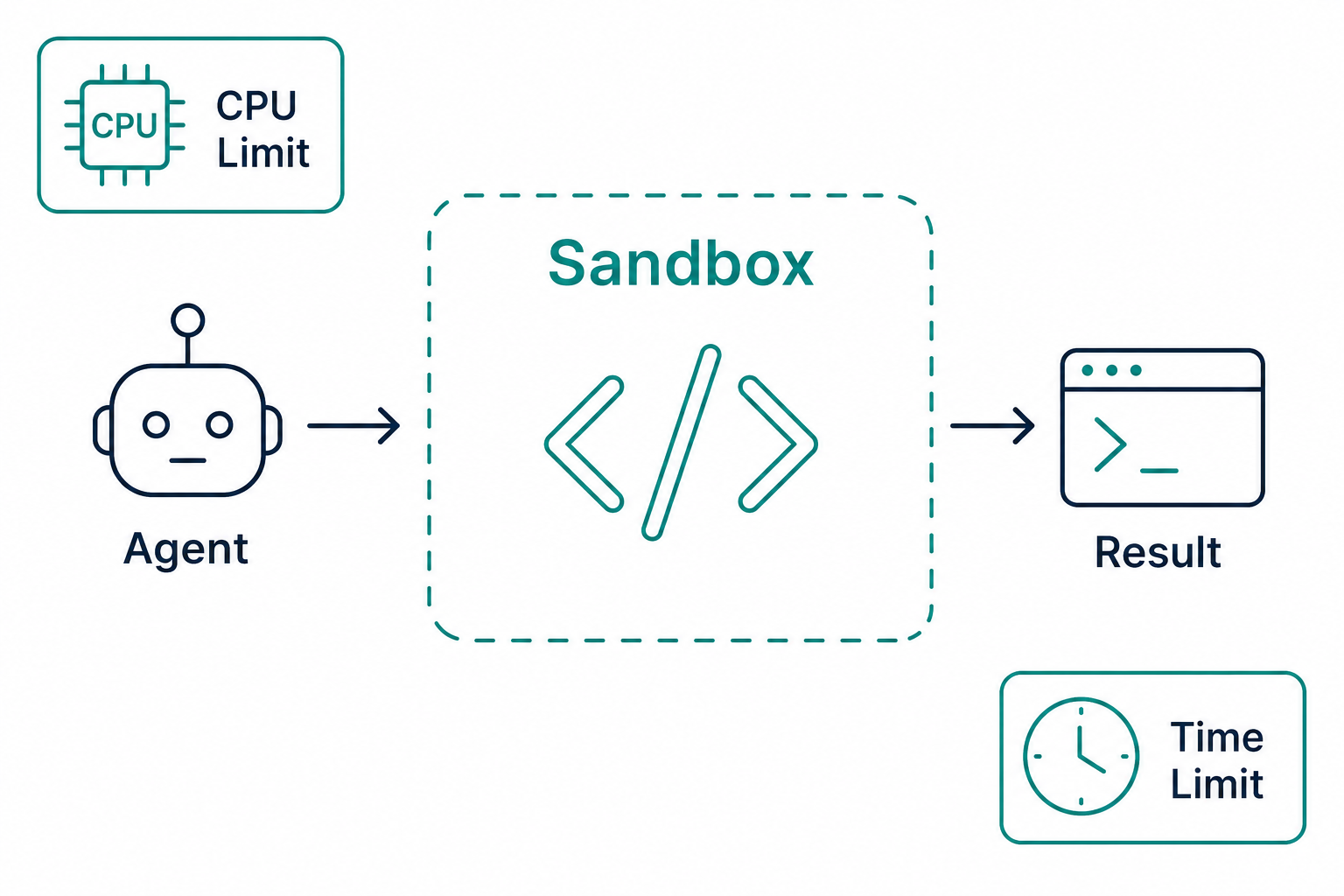
Code execution agent
A code execution agent can run code—often to compute, transform data, or probe libraries—in response to a task.
Step by step: if you must execute code
- Question the need. Many tasks are cheaper and safer as deterministic library code in your service, not LLM-generated scripts.
- Route to an isolated worker. Use a disposable environment: separate container or job queue consumer with no prod DB credentials.
- Cap resources. Enforce CPU, memory, wall-clock time, and output size; kill runaway jobs.
- Minimize filesystem and network. Read-only base image, ephemeral
/tmponly, outbound network off unless narrowly allowlisted. - Return bounded results. Pipe stdout or structured results back as an observation; never stream secrets back into the model context.
Where value shows up
- Quick arithmetic or data shaping without shipping a full microservice for every question.
- Sandboxed evaluation of user-provided formulas in controlled products (still dangerous unless boxed tightly).
Where disasters show up
Running arbitrary machine code suggested by a model on your production server is how incidents become headlines. Even “helpful” snippets can exfiltrate secrets, erase files, or fork bomb careless hosts.
Safer directions
- Dedicated sandbox: isolated container, no production credentials, strict CPU/memory/time limits, read-only filesystem except a temp workspace.
- Language subset: allow only expressions or a DSL you interpret—not general
exec. - Human gate for anything that touches networks or persistent volumes.
Treat code execution as a sharp tool stored in a locked drawer, not a defaults-on feature.
Java sketch — policy object + refuse exec on the API tier
Real sandboxes run elsewhere (container, batch worker). Here we only encode limits and a hard refusal pattern.
package com.codepathindia.agenticai.part5;

import java.time.Duration;

public final class SandboxExecutionSketch {

    public record SandboxLimits(Duration wallClock, int maxStdoutChars, boolean outboundNetwork) {}

    public static String policySummary(SandboxLimits limits) {
        return String.format(
                "sandbox wallClock=%s maxStdoutChars=%d outboundNetwork=%s",
                limits.wallClock(), limits.maxStdoutChars(), limits.outboundNetwork());
    }

    /**
     * Never pass model-generated strings to Runtime.exec on your serving JVM.
     * Queue a job to an isolated runner instead.
     */
    public static void rejectInlineExec(String modelSuggestedCommand) {
        throw new UnsupportedOperationException(
                "Refused inline exec (" + modelSuggestedCommand.length() + " chars) — use isolated worker.");
    }
}
Illustration
Database query agent
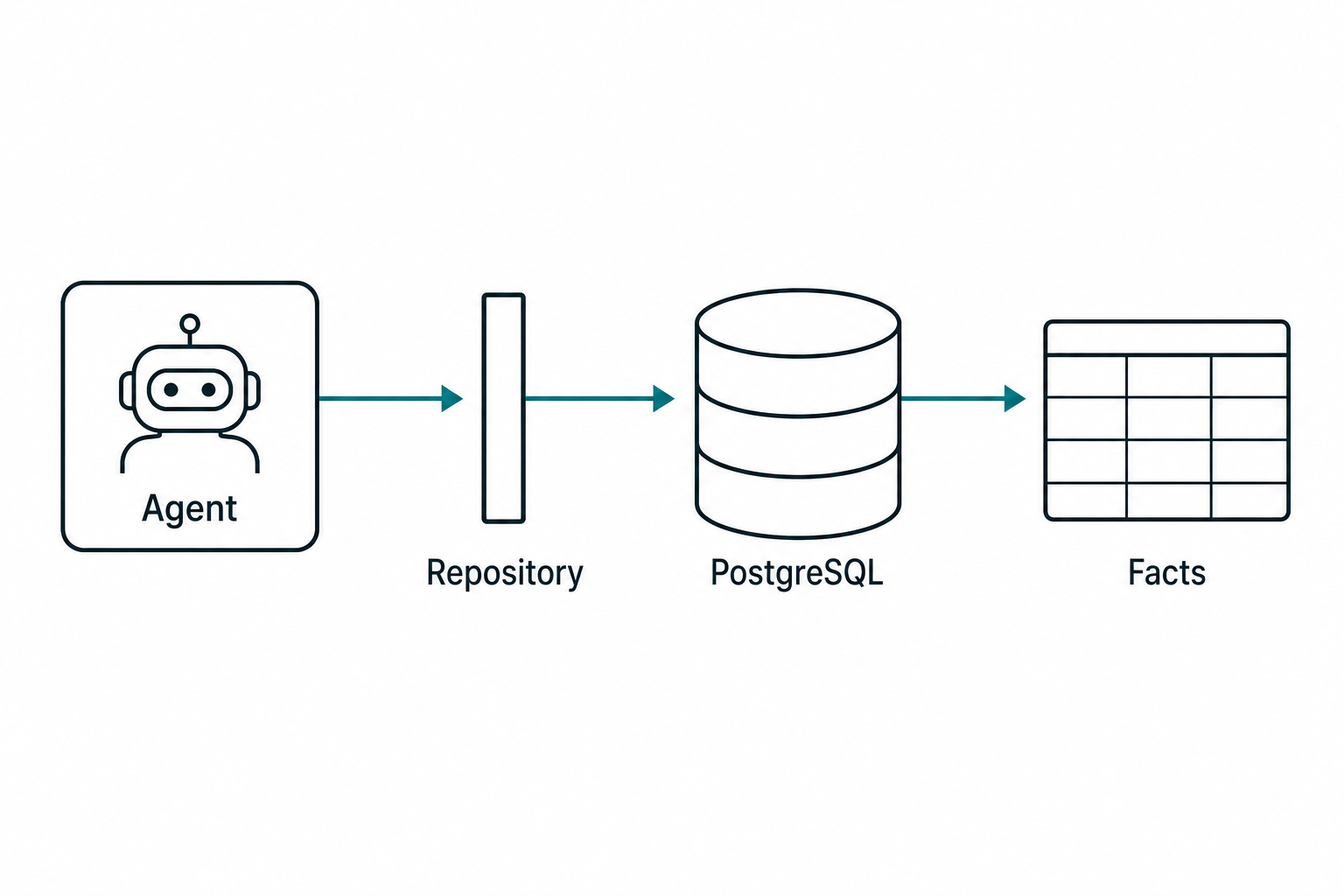
A database query agent answers questions by reading (and sometimes writing) structured data through your data layer—not by hallucinating tables.
Step by step: from question to rows
- Classify intent. Decide read-only analytics versus updates that move money or inventory—writes earn stricter gates.
- Select an approved access path. Map to a repository method, view, or stored procedure you have already reviewed—not ad hoc SQL strings from the model.
- Bind parameters safely. Use prepared statements or ORM bindings so user-influenced values cannot become injection.
- Bound the blast radius. Limit rows, require roles, and aggregate when raw dumps would violate least privilege.
- Return facts to the model. Feed counts, summaries, or small tables as observations; log query shape and duration for slow-query hunting.
Typical split
- Read-heavy assistants: “How many open tickets for team East?” → translated into a parameterized query or a call to
TicketRepository.countOpenByTeam(...). - Write paths: almost always behind strong validation, roles, and often human approval for financial records.
Why raw SQL from the model is a bad default
Even honest mistakes become DELETE anomalies. Parameter binding prevents injection; ORM + repositories narrow what is expressible.
Pattern that scales
Expose tools that wrap specific queries or stored procedures you have reviewed:
get_customer_summary(customer_id)— joins approved views.list_products_under_price(max_price)— bounded result sets.
Let the model choose among those tools, not invent new SQL strings per turn.
PostgreSQL and Spring Boot angle
If you follow Spring Boot + PostgreSQL + AI patterns, your agent executor ultimately calls the same services your REST controllers would—just triggered by an orchestration loop instead of a browser. That reuse is a feature: one source of truth for business rules.
Java sketch — tools call repositories, not raw SQL strings
The model picks get_customer_summary vs list_products_under_price; your CustomerReadRepository implementation owns SQL.
package com.codepathindia.agenticai.part5;

import java.util.List;
import java.util.Optional;

public final class DatabaseQueryAgentSketch {

    public record CustomerSummary(long id, String name, int openTicketCount) {}

    public interface CustomerReadRepository {
        Optional<CustomerSummary> loadSummary(long customerId);

        List<String> productNamesUnderPrice(double maxPrice, int limit);
    }

    public static String toolGetCustomerSummary(CustomerReadRepository repo, long customerId) {
        return repo.loadSummary(customerId)
                .map(c -> c.name() + " — open tickets: " + c.openTicketCount())
                .orElse("Customer " + customerId + " not found");
    }

    public static String toolListProductsUnderPrice(CustomerReadRepository repo, double max) {
        List<String> names = repo.productNamesUnderPrice(max, 20);
        return names.isEmpty() ? "No products under " + max : String.join(", ", names);
    }
}
Illustration
How these topics fit one picture
| Idea | One-line role |
|---|---|
| Tool calling | Let controlled actions run outside pure text. |
| Function calling | Give models a structured way to name tools and fill arguments. |
| API calling | Implement tools as HTTP/service calls you secure and observe. |
| Web search agent | Use retrieval from the web with filters and skepticism. |
| Code execution agent | Run limited code in sandboxes, not on prod shells. |
| Database query agent | Answer with real rows via narrow, reviewed access paths. |
They are not six unrelated buzzwords—they are different lenses on the same discipline: connect reasoning to systems safely.
Common beginner mistakes
- Trusting structure over substance. JSON tool calls still need business validation.
- One omnibus HTTP tool. Prefer small, testable tools with obvious failure modes.
- Shipping search without filters. The web is noisy; curate inputs and outputs.
- Executing model-generated code on prod hosts. Use isolation and caps by default.
- Free-form SQL from the LLM. Wrap data access in reviewed repositories or procedures.
- Logging secrets. Redact tokens and PII in tool traces before they hit dashboards.
Final summary
Tools and function calling are how agentic systems earn the right to say “I did something for you.” They turn suggestions into typed, logged, retryable work against APIs, search indexes, sandboxes, and databases—always under policies you maintain.
Start boring: few tools, strict schemas, great logs. Expand when you understand failure modes. The architecture ideas from Part 3 still apply—the executor is simply richer now because your toolbelt is wider.
Series navigation